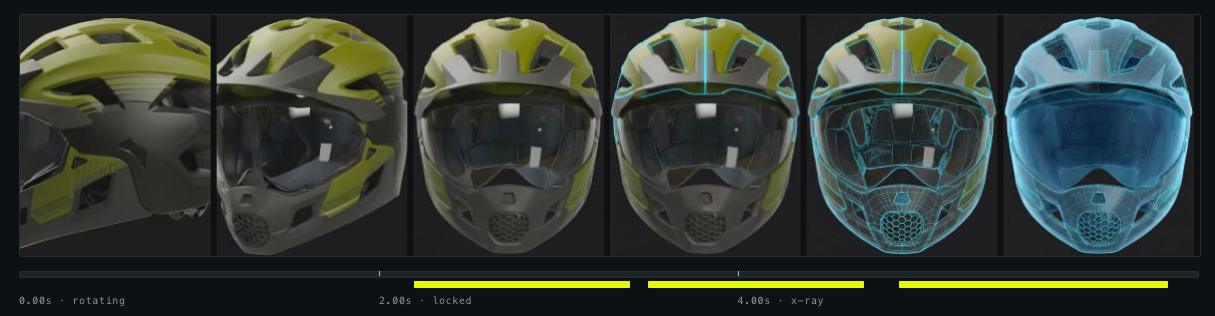
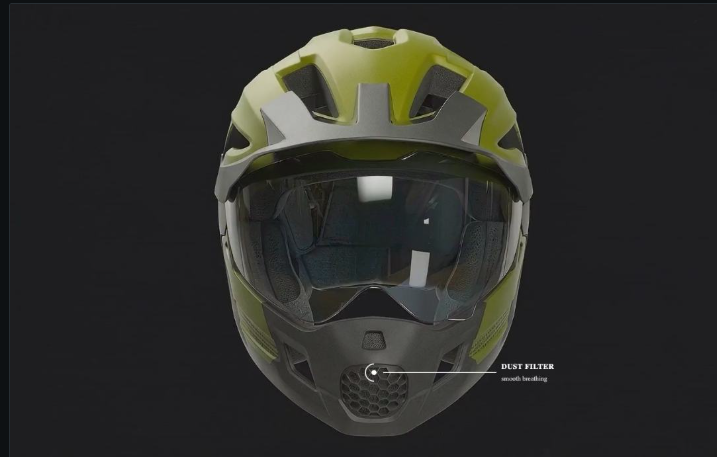
A full-bleed product section where scrolling scrubs a helmet video frame by frame, with timed callouts pinned to features on the helmet itself. Built as three new files with nothing in the base theme touched, and with the one dependency that could have sunk it verified before a line of the section was written.
The brief asked for the Apple product-page effect: a video whose playhead follows the scrollbar, holding full-screen while the page moves through it. That reading has a cheap impostor, a video that simply autoplays when it enters the viewport, so the first job was pinning down which one the brief meant. It was the real one.
Dawn already ships a video section, and reusing it was the obvious move. Reading it ruled it out: it wraps the video in deferred-media, which keeps the file inside a template until someone clicks the poster, and it hardcodes controls: true. Scrubbing needs the exact opposite: loaded and buffered up front, no controls, never looking like a player. Extending it meant gutting it.
| Approach | Why it won or lost | Verdict |
|---|---|---|
Sticky-pinned video, scroll mapped to currentTime | One file, authored once, reverses for free: scrolling back up is just a lower number. | Built |
| Canvas image sequence | What Apple actually does, and frame-perfect. Also 200+ images to host, preload, and hand to a merchant who will one day want to swap them. | Held in reserve |
| Third-party app | No app renders the custom callout design, which is the entire point of the section. | Rejected |
| Extend Dawn's video section | Click-to-load, poster-first, controls on. Structurally opposed to scrubbing. | Rejected |
Scroll-scrubbing rests on one assumption most builds discover far too late: the browser has to be able to seek the file. That needs two things, and both are invisible until they fail.
The MP4 needs its moov atom at the front, the "faststart" flag. Without it a browser must download the entire file before it can seek at all, so the section sits dead through the whole download and then works perfectly. It passes every local test and fails in production. Second, the host has to serve HTTP range requests, or seeking is impossible no matter how the file is built.
The source clip was exported with every frame as a keyframe, which was the right call. Rather than take that on trust, the file was parsed at the box level and the CDN probed directly:
| Check | Result |
|---|---|
| Box order | ftyp → moov → mdat, faststart intact |
| Sync sample table | No stss box: all 197 frames are keyframes |
| Codec | avc1 / H.264, 1920×1080, 30 fps |
| Served by CDN | 12,542,679 bytes, byte-identical to the export |
| Range request | HTTP 206, content-range: bytes 0-1023/12542679 |
That byte count matters more than it looks. Shopify re-encodes anything uploaded through the video picker, which would have destroyed the all-keyframe encode. The file was uploaded to Files instead and came back out unchanged: technique confirmed rather than assumed.
The design uses a full-bleed crop over letterboxing: more cinematic, and safe here because the helmet sits center-frame. But it moves the difficulty somewhere unexpected. Callouts are authored against the video frame, while object-fit: cover crops that frame differently at every window shape. A coordinate measured on one monitor lands somewhere else on another.
So the component measures the video's true rendered box, including the parts cropped off screen, and publishes four custom properties that CSS positions against. It recalculates on resize only, never during scroll, so scrubbing stays free of layout work.
| Stage | Video fills by | Rendered box | Cropped per side |
|---|---|---|---|
| 1440 × 813 | height | 1445 × 813 | 2.7px horizontal |
| 2560 × 993 | width | 2560 × 1440 | 223.5px vertical |
That second row is the catch. On an ultrawide monitor only the middle band of the frame survives, and the helmet fills the frame almost top to bottom, so "the top of the helmet" and "the mouthpiece" are precisely the callouts most at risk. Positions were measured off the footage against a labeled grid, then rendered at both window shapes to confirm they land. The crown callout moved down four points after the ultrawide test showed its marker clipped against the top edge.
Every number below came from driving the real component against the real CDN file in a headless browser: scripted scrolling, pixel fingerprints, network accounting. Not from looking at it and deciding it seemed fine.
Four defects survived code review and died under a camera. Two were in the product; two were in the test rig, which is its own lesson: a passing test can be lying.
border: … solid var(--accent) invalid and the background transparent. Ring, dot, and rule all vanished in silence, leaving labels floating with nothing pointing at anything. Every numeric test still passed.border-box reset, only three scoped declarations. Padding was adding to max-width, so the mobile image stack rendered 590px wide instead of 560.The callout's ring was a 270° arc with its gap at the upper right, exactly where the rule exits. The rule read as floating beside a broken circle instead of running out of it, and it sat 1.25px below the axis besides.
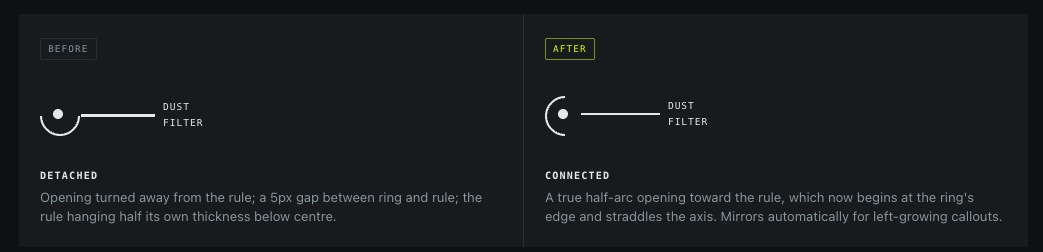
The mechanism is worth keeping: with border-radius: 50% each border side owns a 90° wedge and they meet on the diagonals, so two transparent adjacent sides give a 180° opening centered on a diagonal. Then rotate(45deg) swings that center round to due east.
Some of these are scope lines drawn on purpose and recorded as such. A case study that lists only wins is a brochure.
sections/section-scroll-video.liquid · assets/section-scroll-video.css · assets/scroll-video.js. One section, one stylesheet, one vanilla web component. No libraries, no base-theme edits, no template changes, no new locale keys. Theme Check clean. The video is never requested below 990px or under reduced motion, where the section falls back to a static image stack.